Dastardly XSS attacks, and Socratic Seminars
Years ago, as a high schooler, I discovered and accidentally performed a malicious XSS attack, making my classmates Socratic seminar submissions for the past hour inaccessible. That happened unintentionally, and making it right was an order of magnitude more complex than performing it. I certainly would not encourage anyone else to take up a similar task.
But it's entertaining, and I've been meaning to write up some of my exploits, lest I forget them.
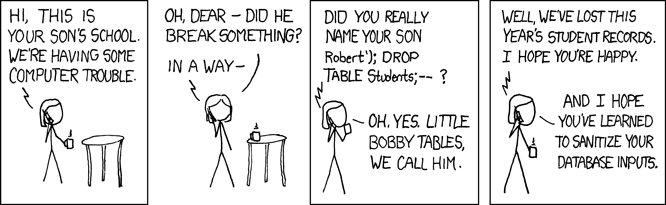
Cross-site scripting (XSS) is a security vulnerability where attackers inject malicious scripts into trusted websites, typically executed in the context of another user's session. In this scenario, it was the execution of my message on all other users' devices, each time they connected to the chat.
Socratic Seminar
A Socratic seminar is an opportunity for everyone to engage in extended intellectual conversation. One day, my unsuspecting teacher conducted one of these via Backchannel Chat, a now decommissioned administratively moderated chatroom. The goal was to allow asynchronous comment threads without pre-empting the speaker.
This is Fun
As students tend to do, we quickly discovered how to embed images into our messages via the <img> tag. The knowledge meandered through the class to me.
"So, I can put in HTML here," I surmised. Images became horizontal rules, became blank messages, spoofed messages, and a whole menagerie of stylized nonsense. Not very Socratic, I know.
And why stop there? Maybe I could put a <script> in there too. I tucked my smile underneath my hand and hit enter.
"Hm," my teacher wondered. "Why does it say that it's disconnected? It seems like it's working fine" He dismissed the pop-up, then moved on and resumed probing the class for questions and comments.
The Mistake
Well, I thought, "that alert box was smooth enough. What else can I do?" A lightbulb went off in my brain. Aha! I'll simply reload everyone's website. That's innocent and harmless enough.
<script>
window.location.reload();
</script>
and… SEND Immediately, everyone's screen wiped white. A second later, they loaded the website then went white again. Another second, and another reload. "I hadn't anticipated that every time the message loaded, it would reload the website, triggering an endless loop with no escape. My face paled, and I burrowed my face in my arms. Nobody knows it's me yet, I thought. "What the…" the class' steady stream of typing halted, and my teacher turned to stare at the flashing screen from the projector. "Looks like this is broken," he muttered. "Does that mean we can leave?" a classmate of mine volunteered. Without recourse, the teacher shook his head at the screen in disbelief. A symphony of backpacks excitedly zipped shut in anticipation.
Red-handed
Unfortunately for me, I had some level of notoriety for both my shenanigans and my technical interest. And, as fate would have it, my notoriety had found a seat right next to me, in the form of my classmate Dory. And Dory was no idiot, and she had worked hard for the past hour commenting and responding and defending. She did not hesitate to issue me an ultimatum "Either you tell him what you've done, or else I will," she threatened. And so, with my fate decided for me, I crawled my way up to my bewildered teacher's desk. "Monsieur," I whimpered. "I might be responsible for that, uh, problem we're having." I can't really imagine what went through his head, but I may have seen a little steam emerge from his ears. However, ever-generously, he offered me a chance to fix it, which I eagerly accepted. How hard could it be? After all, I just needed to disable window.reload. Easy enough, right?
Wrong
You cannot disable window.reload in a browser. Fine, so I just need to change innerHtml to textContent. Well, it turns out that browsers are not huge fans of arbitrary rewrites of code executing on websites. A basic user-script will not solve the issue, because it is additive, and will not have a chance to run before the accursed message will reload the page. So, I found the Resource Override extension. This allowed me to overwrite the script at a URL with one of my own making. After delicately picking my way through analytics, user management and other miscellaneous scripts, I found a juicy one, with lots of related logic. There was just one problem. The code was minified and uglified to an extreme - single-letter variables, nested ternaries, and indecipherable logic. function g(a){a?console.log("Hello, "+a+"!"):console.log("Hello, world!")}g("Alice"); Imagine pages of this. Reams of it flowed encoding messages, profile pictures, dropdown menus, sidebars and content controls. I spent the entire night combing through it and sectioning it off. After all, my head was riding on this. So far, my parents were none the wiser and I preferred to keep it that way. So, on I trudged, gathering a picture about how this website worked. In summary, it loaded the page, setting up a bespoke framework to load its elements and messages, then connected to a websocket, requested a batch of messages and began rendering messages as they came in. With all this straight, I had the straightforward fix of substituting the usage of .innerHTML with .textContent
Extrapolations
Looking back now, it's interesting to think about a bug like this. What if the first 20 messages had been embedded into the HTML (a la server-side rendering / SSR) instead of being dynamically loaded over the JS? I would've had a fine conundrum, as the message would immediately cause the page to load before even the resource override script could do anything like bricking the window.reload function. As far as I can tell, the best solution to that would be loading it through a proxy that will strip out window.reload calls, but that seems rather challenging. Perhaps a service worker or another Chrome extension with HTTP rewrite privileges could have done something similar with slightly less effort. Either way, I'm very glad that I didn't have to deal with it.